
Build agents you own
One binary on macOS, Linux or Windows. It polls outward for work, so nothing on your network needs an inbound port.


Build, sign, and ship Flutter to the App Store and Google Play from build agents you own.


Works with the tools your release already runs through.
Drag steps onto a canvas and wire them together. The YAML stays in sync in both directions, and every past run draws itself on the same graph.


Agents, signing, steps and live progress, all part of the same platform.
One binary on macOS, Linux or Windows. It polls outward for work, so nothing on your network needs an inbound port.
Eight credential types, from Android keystores to App Store Connect keys, scoped per repository.


Steps, templates and toolchains, versioned as publisher/name@1.0.0. Keep them private,
share them, or sell them.


Runs stream over SignalR to the dashboard, the iOS Lock Screen and the Android notification shade.

Watch runs, approve releases, and check your agents from your phone.


FlightStack ships a remote MCP server. Connect it once and your agent can read builds, edit pipelines, and ship a release without leaving the editor. Self-hosting? Point it at your own host instead.
claude mcp add --transport http flightstack https://api.flightstack.voostack.com/mcp 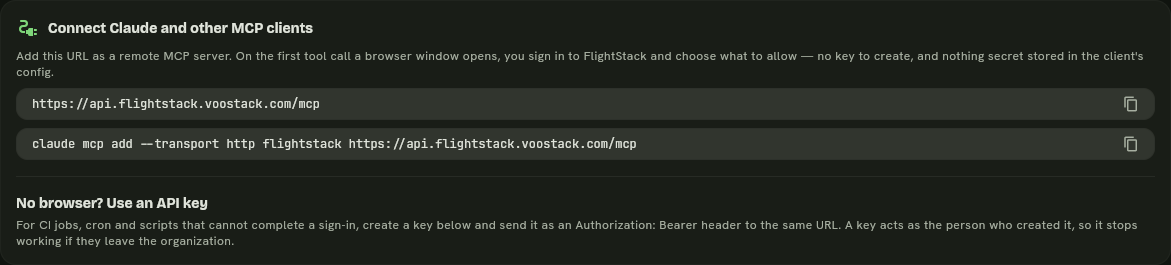 Scopes and setup
The first-party set covers the whole Flutter release path. Anything else installs from the marketplace and shows up in the editor without a restart.
The notification step posts to Slack, Discord, Microsoft
Teams, or any webhook, with a full embed builder on Discord.
The agent picks the job up, matches it against its toolchain, and streams the log back while it runs.
Install the CLI
brew install voostack/flightstack-cli-tap/flightstackcase "$(uname -m)" in x86_64|amd64) ;; *) echo "No published build for $(uname -m)"; exit 1 ;; esac
url=$(curl -fsSL https://api.github.com/repos/voostack/flightstack-releases/releases | grep -o 'https[^"]*flightstack-[0-9][^"]*linux-x64\.tar\.gz' | head -1)
[ -n "$url" ] || { echo "No build found. See https://github.com/voostack/flightstack-releases/releases"; exit 1; }
curl -fsSL "$url" | tar xz && sudo install flightstack flightstack-agent /usr/local/bin/$asset = (irm https://api.github.com/repos/voostack/flightstack-releases/releases).assets |
Where-Object name -like 'flightstack-[0-9]*-windows-x64.zip' | Select-Object -First 1
if (-not $asset) { throw "No build found. See https://github.com/voostack/flightstack-releases/releases" }
$dest = "$env:LOCALAPPDATA\FlightStack"; $zip = "$env:TEMP\flightstack.zip"
irm $asset.browser_download_url -OutFile $zip
Expand-Archive $zip $dest -Force
# Read the User scope, not $env:Path: that is Machine + User merged, and
# writing it back to "User" copies every machine entry into your user PATH.
$user = [Environment]::GetEnvironmentVariable("Path","User")
if ($user -notlike "*$dest*") {
[Environment]::SetEnvironmentVariable("Path", ($user.TrimEnd(';') + ";$dest"), "User")
}
# then open a new terminalSign in
flightstack loginRegister this machine as an agent
flightstack agent register --name "build-01" --org YOUR_ORG_IDLeave --org off and the agent is public, meaning any organisation can use it.
Start it
flightstack agent start --daemonConnect a repository and create a pipeline
In the dashboard: Repositories, Connect Repository, then Pipelines, Create Pipeline.
Push
git push origin mainEverything on hardware you already pay for.
We run the control plane, you keep the build agents.
Yes. The control plane runs on your own infrastructure with Docker Compose, Kubernetes, or a single server, backed by your own PostgreSQL. Build agents run wherever you put them.
iOS, Android, and web. iOS builds need a macOS agent with Xcode; Android and web build anywhere. The agent itself runs on macOS, Linux, and Windows, and FlightStack routes each job to an agent that has the toolchain it needs.
Those meter your build minutes. FlightStack runs on hardware you already own, so a two-hour iOS build costs you nothing beyond electricity. The visual editor and the YAML are the same artifact rather than two things to keep in sync.
Only for iOS. Register any Mac as an agent and it handles the iOS half while a Linux box takes Android and web.
Free covers 500 pipeline runs a month against your own agents. Team is $49 per organization per month for 10,000 runs. There is no per-minute meter on either.
Export everything in one shot: pipelines, re-encrypted secrets, repositories, and run history. Then point the same agents at a self-hosted control plane and keep going.
Both. The CLI covers builds, agents, pipelines, organizations, templates, and publishing. The REST API is documented, and there is a remote MCP server if you would rather drive it from a coding agent.
Yes. A step is a small spec with typed inputs, outputs, and a shell body. Publish it to the marketplace as private, shared with named organizations, or public, and reference it from any pipeline as publisher/name@version.
Free to start, no credit card, and no per-minute meter at any tier.